

티스토리 뷰
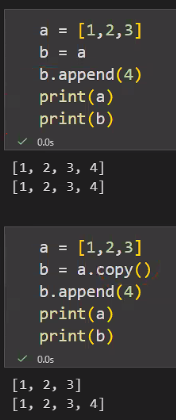
+ pandas에서는 .copy()가 deepcopy임
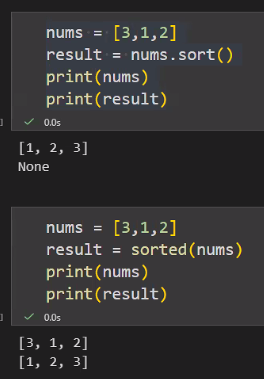
Q4. 아래 코드의 출력 결과로 올바른 것은? 🚀 도전
nums = [3,1,2]
result = nums.sort()
print(nums)
print(result)
A. [1, 2, 3] / [1, 2, 3]
B. [3, 1, 2] / None
C. [1, 2, 3] / None
D. 오류 발생(sort()는 반환값이 반드시 리스트여야 함)
-> sort는 원본 자체를 바꿔주는 메서드이기 때문에 result는 반환되지 않음
반면 sorted는 원본을 바꾸지 않고 새로운 반환값을 줌
Q6. 더 큰 수 반환 함수 🧰 필수
두 수 a, b를 받아 더 큰 값을 반환하는 함수 bigger(a, b)를 작성하세요.
(두 수가 같다면 어떤 수가 나와도 됨.)
- 예: bigger(3, 5) → 5
def bigger(a, b) :
    if a >= b :
        return a
    else :
        return b
Q7. return 오류 디버깅 🧰 필수
아래 함수가 의도대로 동작하지 않는 이유를 1~2문장(이유, 반환값은 무엇?)으로 설명하고, 올바르게 수정하세요.
( 의도 : 10 출력 )
def double(n):
    n * 2

result = double(5)
print(result)
# 이유 : double(n) 함수를 실행했을 때 return 값이 없어서 None으로 출력된다.
# 올바르게 수정한 코드
def double(n):
    return n * 2

result = double(5)
print(result)
Q8. 0 입력 시 종료하는 누적합 프로그램 🧰 필수
사용자에게 정수를 계속 입력받아 합을 누적하세요.
- 단, 0을 입력하면 종료
- 0은 합계에 포함하지 않음
- 종료 후 합계를 출력
result = 0
while num != 0 :
    num = int(input("정수를 입력하세요(0을 입력하면 종료) :"))
    result += num

print(result)
# 내가 작성한 코드
total = 0

while True:
	num = int(input())
    if num == 0:
    	break
    total += num

print(total)
# 정답 코드
Q9. Class 출력 예측 + 수정 🚀 도전
아래 코드의 출력 결과를 예측하고(2줄), 왜 그런지 설명한 뒤, 각 객체가 자기만의 scores 리스트를 갖도록 수정하세요.
class Student:
    scores = []

    def add_score(self, score):
        self.scores.append(score)

s1 = Student()
s2 = Student()

s1.add_score(90)
s2.add_score(80)

print(s1.scores)
print(s2.scores)
# 출력 결과 :
# print(s1.scores) -> [90, 80]
# print(s2.scores) -> [90, 80]
# scores가 전역변수로 지정되어 있기 때문에 각각의 값을 구분해서 저장할 수 없다
scores가 클래스 변수라서 s1, s3 인스턴스가 같은 리스트를 공유한다
그리고 리스트는 가변 객체(mutable)라서 append가 공유 객체에 반영된다
# 제출 코드
class Student:
    def add_score(self, score):
        self.scores = []
        self.scores.append(score)

s1 = Student()
s2 = Student()

s1.add_score(90)
s2.add_score(80)

print(s1.scores)
print(s2.scores)
# 정답 코드
class Student:
    def __init__(self):
        self.scores = []

    def add_score(self, score):
        self.scores.append(score)

s1 = Student()
s2 = Student()

s1.add_score(90)
s2.add_score(80)

print(s1.scores)
print(s2.scores)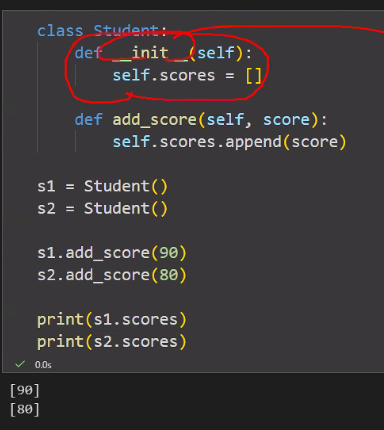
Q10. 아래 코드 실행 후 order_date 컬럼 dtype으로 가장 적절한 것은? 🧰 필수
orders = pd.read_csv("bootcamp_orders.csv", parse_dates=["order_date"])
orders["order_date"].dtype
A. object
B. datetime64[ns] (M8[ns])
C. int64
D. category
parse_dates = ["order_date"]
: datetime으로 형 변환하는 함수
Q11. DataFrame df에서 첫 번째 행의 age 값을 가져오는 코드로 가장 적절한 것은? 🧰 필수
(단, df는 기본 인덱스 0,1,2…를 가진다고 가정)
A. df.loc[0, "age"] → "age"라는 라벨이 들어가니까 loc!!!!
B. df.iloc[0, "age"]
C. df.loc["age", 0]
D. df.iloc["age", 0]
행렬 이니까 인덱스(행), 컬럼명(열) 순서대로 적기!
Q12. 아래 코드의 동작으로 올바른 설명은? 🧰 필수
orders2 = orders.drop_duplicates(subset=["order_id"], keep="first")
A. order_id가 중복인 행을 모두 삭제하여 해당 order_id가 완전히 사라진다
B. 중복 행을 제거하되, order_id별로 첫 번째 행만 남긴다
C. 중복 여부와 상관없이 첫 번째 1행만 남긴다
D. 원본 orders도 항상 함께 바뀐다
Q13. 아래 코드 결과로 올바른 것은? 🚀 도전
import numpy as np
import pandas as pd

df = pd.DataFrame({
    "category": ["coffee", "coffee", "tea"],
    "rating": [5, np.nan, 3]
})

print(df.groupby("category")["rating"].count())
A. coffee=2, tea=1
B. coffee=1, tea=1
C. coffee=2, tea=0
D. coffee=1, tea=0
Q14. 아래 설명 중 가장 올바른 것은? 🧰 필수
merged = orders.merge(customers, on="customer_id", how="left")
A. customers에 없는 customer_id의 주문은 자동으로 삭제된다
B. orders에 없는 customer_id의 고객은 자동으로 삭제된다
C. orders의 모든 행은 유지되고, 매칭되지 않는 고객 정보는 NaN이 된다
D. left merge는 기본적으로 중복을 제거한다
Q15. 원본 주문행(df_orders)에서 카테고리별 총매출 합계 막대그래프를 가장 확실하게 그리는 방법은? 🚀 도전
A. sns.barplot(data=df_orders, x="category", y="revenue")
B. sns.barplot(data=df_orders, x="category", y="revenue", estimator="sum")
C. df_sum = df_orders.groupby("category")["revenue"].sum().reset_index()로 합계를 만든 뒤, sns.barplot(data=df_sum, x="category", y="revenue")
D. sns.histplot(data=df_orders, x="category")
Q16. 그래프에서 라벨/눈금이 겹칠 때 가장 흔히 쓰는 해결 방법은? 🧰 필수
A. plt.tight_layout()
B. plt.reset_index()
C. plt.groupby()
D. plt.astype(int)
Q17. 데이터 로드 & 기본 점검 🧰 필수
1. customers/orders를 pandas로 읽고 각각 shape 출력

2. orders에서 order_id 기준 중복 행 개수 출력

print('dup order_id count:',orders['order_id'].duplicated().sum())
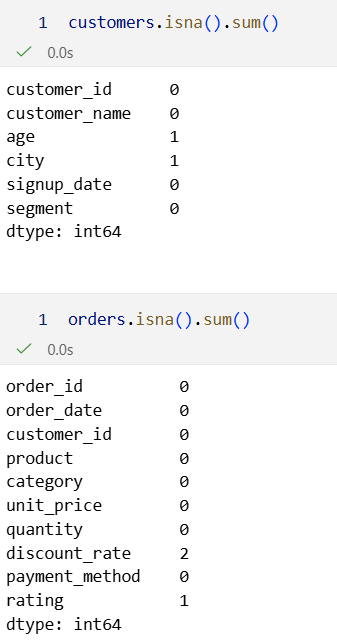
3. customers와 orders 각각에 대해 컬럼별 결측치 개수를 출력
Q18. 주문 데이터 정리 + 매출 컬럼 만들기 🧰 필수
orders 데이터에 대해 아래를 수행하세요.
1. order_id 기준 중복 제거(첫 행 유지)
import pandas as pd

customers = pd.read_csv("./data/bootcamp_customers.csv", encoding='utf-8')
orders = pd.read_csv("./data/bootcamp_orders.csv", encoding='utf-8')


orders_clean = orders.drop_duplicates(subset=['order_id'], keep='first')
2. discount_rate 결측치는 0으로 채우기
orders_clean = orders_clean['discount_rate'].fillna(0)
3. revenue = unit_price * quantity * (1 - discount_rate) 컬럼 생성
4. 정리된 orders의 행 개수와 revenue 총합을 출력

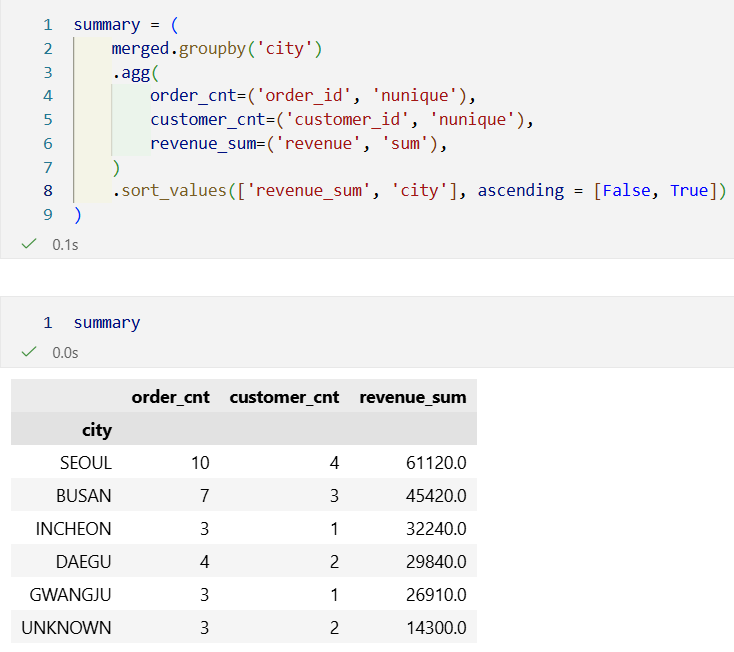
Q19. 고객 정보 붙이고 도시별 매출 요약 만들기 🚀 도전
1. Q18의 정리된 orders를 customers와 left merge 하세요.
merged = orders_clean.merge(customers, on='customer_id', how='left')
2. city가 결측치인 경우 "UNKNOWN"으로 채우세요.
merged['city'] = merged['city'].fillna("UNKNOWN")
3. 도시별로 아래 집계를 구하세요.
- order_cnt : 도시별 고유 주문 수 (nunique(order_id))
- customer_cnt : 도시별 고유 고객 수 (nunique(customer_id))
- revenue_sum : 도시별 매출 합계
- 정렬: revenue_sum 내림차순, city 오름차순
Q20. 시각화 리포트(2개 그래프) 🚀 🚀 🚀 도전
Q18~Q19 결과를 활용해 아래 2개 그래프를 그리세요.
1. 카테고리별 총매출 막대그래프(Bar Plot)
- x: category, y: revenue_sum(총합)
- 제목/축 라벨 포함
- (권장) 매출 내림차순으로 카테고리 정렬
import matplotlib.pyplot as plt
import seaborn as sns
category_sum = (
orders_clean.groupby('category')['revenue'].sum()
.reset_index(name='revenue_sum')
.sort_values('revenue_sum', ascending = False)
)plt.figure(figsize = (7,4))
sns.barplot(data=category_sum, x='category', y='revenue_sum')
plt.title('Total Revenue by Category')
plt.xlabel('Category')
plt.ylabel('Revenue Sum')
plt.tight_layout()
plt.show()
2. 일자별 매출 추이 선그래프(Line Plot)
- x: order_date, y: daily_revenue
- 제목/축 라벨 포함
- 날짜 라벨이 겹치면 회전 처리
daily_revenue = (
    orders_clean.groupby('order_date')['revenue'].sum()
    .reset_index(name='daily_revenue')
    .sort_values('order_date')
)
plt.figure(figsize = (7,4))
plt.plot(daily_revenue['order_date'], daily_revenue['daily_revenue'], marker = 'o')
plt.title('Daily Revenue Trend')
plt.xlabel('Order Date')
plt.ylabel('Daily Revenue')
plt.xticks(rotation=45)
plt.tight_layout()
plt.show()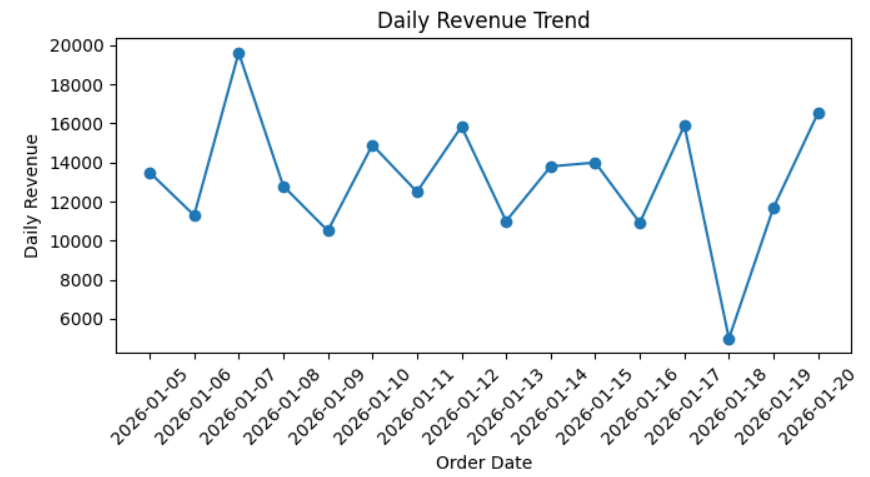
파이썬 전처리/시각화 성취도 평가와 기초 프로젝트 주제 선정 등으로 인해 개인 공부를 전혀 할 수 없었다.
프로젝트 주간 시작인데, 팀 활동을 최우선으로 하되 틈틈이 코드카타와 같은 개인 공부도 할 수 있도록 신경 써야겠다!
'내일배움캠프 데이터 분석' 카테고리의 다른 글
| 25일차) 내일배움캠프 데이터 분석 TIL - 기초 프로젝트(3) (0) | 2026.01.27 |
|---|---|
| 24일차) 내일배움캠프 데이터 분석 TIL - 기초 프로젝트(2) (0) | 2026.01.26 |
| 22일차) 내일배움캠프 데이터 분석 TIL - 파이썬 전처리/시각화(5) (1) | 2026.01.22 |
| 21일차) 내일배움캠프 데이터 분석 TIL - 파이썬 전처리/시각화(4) (0) | 2026.01.21 |
| 20일차) 내일배움캠프 데이터 분석 TIL - 파이썬 전처리/시각화(3) (0) | 2026.01.20 |
- Total
- Today
- Yesterday
- 텍스트분석
- 코딩처음
- 데이터시각화
- 프로그래밍입문
- 파이썬입문
- 비전공자코딩
- 내일배움캠프
- 구글코랩
- 데이터분석
- 머신러닝
- Python
- 파이썬
- SQL
- Til
- 중학생코딩
- 데이터분석입문
- GoogleColab
- 코드카타
- git
- github
- 태블로
- 통계
- 판다스
- Tableau
- 코딩기초
| 일 | 월 | 화 | 수 | 목 | 금 | 토 |
|---|---|---|---|---|---|---|
| 1 | 2 | |||||
| 3 | 4 | 5 | 6 | 7 | 8 | 9 |
| 10 | 11 | 12 | 13 | 14 | 15 | 16 |
| 17 | 18 | 19 | 20 | 21 | 22 | 23 |
| 24 | 25 | 26 | 27 | 28 | 29 | 30 |
| 31 |