

티스토리 뷰
SQL 라이브 세션 3 (집계 함수)
WHERE 은 전체에 대한 조건 HAVING은 GROUP BY에 대한 조건
집계 함수 : 여러 행을 하나의 값으로 요약
COUNT(개수), SUM(합계), AVG(평균), MIN(최소), MAX(최대)가 있고, 보통 GROUP BY와 함께 사용
- COUNT는 NULL인 행도 셈! COUNT(*)는 행 갯수 세주는 함수
✅ COUNT(*) : 결과 행(row)의 개수(=조건을 만족한 행 수)를 셉니다.
✅ COUNT(col) : col이 NULL이 아닌 값의 개수를 셉니다.
✅ COUNT(DISTINCT col) : col의 서로 다른(non-NULL) 값의 개수를 셉니다. (=고유값)
select
	count(*),  #null 포함
	count(distinct order_id),  #null 포함 X
	count(distinct customer_id)  #null 포함 X
from basic.order_items;
select
	sum(unit_price*quantity) as gross_sales,
	sum(unit_price*quantity*(1-discount_rate)) as net_sales
from basic.order_items
where order_status='completed';
미니 실습 A
문제: `order_status='completed'`에서 아래를 한 번에 출력하세요.
- 전체 아이템 행 수
- 주문 수(중복 제거)
- 리뷰 개수(NULL 제외)
출력 컬럼명
- `completed_item_rows`, `orders`, `review_cnt`
select
	count(*) as completed_item_rows,
	count(distinct order_id) as orders,  #중복 제거
	count(review_score) as review_cnt  #null 제외
from basic.order_items
where order_status = 'completed';
⚠️ 자주 하는 실수 B-1: 그룹 기준에 없는 컬럼을 SELECT에 넣기
`GROUP BY`를 쓰는 쿼리에서 SELECT/HAVING/ORDER BY에 나온 컬럼은
- 집계 함수로 감싸져 있거나 (`SUM`, `COUNT`, `MAX` …)
- GROUP BY 컬럼이거나 해야한다.
이 조건을 만족 못하면 보통 이런 오류가 납니다
미니 실습 B
문제: `basic.order_items` 테이블에서 주문 상태가 `completed`인 건만 대상으로 한다.
그 다음 지역(`region`)별로 아래 3가지를 계산해 결과를 출력하라.
1. `orders` : 해당 지역의 서로 다른 주문 수(order_id 기준)
2. `customers` : 해당 지역의 서로 다른 고객 수(customer_id 기준)
3. `net_sales` : 각 주문 아이템의 실매출을 합한 값
- 실매출 = `unit_price × quantity × (1 - discount_rate)`
- 지역별로 위 실매출을 모두 더해 `net_sales`로 출력
마지막으로 결과를 `net_sales` 내림차순(DESC) 으로 정렬하라.
select
	region,
	count(distinct order_id) as orders,
	count(distinct customer_id) as customers,
	sum(unit_price*quantity*(1-discount_rate)) as net_sales
from basic.order_items
where order_status='completed'
group by region
order by net_sales desc;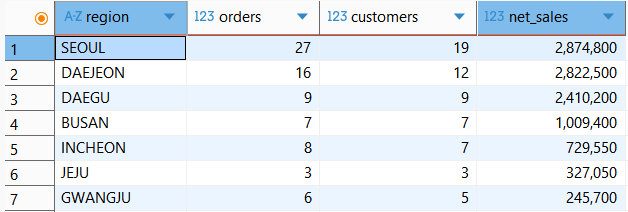
별칭(alias)과 GROUP BY/HAVING
- MySQL에서는 SELECT에서 만든 별칭(alias)을 `GROUP BY`, `ORDER BY`, `HAVING`에서 참조 가능
- 하지만 WHERE에서는 표준 SQL상 별칭 참조 허용 X
> 실무 팁: 혼동/모호성을 줄이려면, 중요한 집계 조건은 HAVING에서 표현식을 직접 쓰거나, 서브쿼리/CTE로 분리하는 방식이 안전함
미니 실습 C
문제 : `basic.order_items` 테이블에서 주문 상태가 `completed`인 데이터만 대상으로, 고객 세그먼트(`customer_segment`)별 리뷰 지표를 집계해 출력하세요.
출력 컬럼:
- `customer_segment`
- `review_cnt` : 해당 세그먼트의 리뷰 점수 개수 (`COUNT(review_score)` 기준 — 즉 `review_score`가 NULL이 아닌 것만 카운트)
- `avg_review` : 해당 세그먼트의 평균 리뷰 점수 (`AVG(review_score)`)
추가 조건:
- `review_cnt`가 20개 이상인 세그먼트만 결과에 포함 (`HAVING` 사용)
- 정렬: `avg_review` 내림차순(DESC)
select
	customer_segment,
	count(review_score) as review_cnt,
	avg(review_score) as avg_review
from basic.order_items
where order_status = 'completed'
group by customer_segment
having count(review_score) >= 20
order by avg_review desc;
조건부 집계(Conditional Aggregation)
GROUP BY로 만든 그룹 안에서, “특정 조건을 만족하는 행만” 세거나 합산하는 패턴
SUM(CASE WHEN 조건 THEN 1 ELSE 0 END)-- 조건 만족 '건수'SELECT
channel,
COUNT(*) AS completed_items,
SUM(CASE WHEN coupon_code IS NOT NULL THEN 1 ELSE 0 END) AS coupon_items,
ROUND(SUM(CASE WHEN coupon_code IS NOT NULL THEN 1 ELSE 0 END)/COUNT(*)*100,1) AS coupon_item_pct
FROM basic.order_items
WHERE order_status='completed'
GROUP BY channel;
# ROUND 함수는 소수점 정리해주려고 한 것임
# ROUND(원하는 숫자, 소수점 아래 숫자 갯수)미니 실습 D
문제 : `delivery_type`별로 완료 주문(`completed`)의 평균 배송일을 계산하세요.
- `avg_delivery_days` = `AVG(delivery_days)` (소수점 2자리)
- `delivery_days`가 NULL인 경우(예: pickup)는 평균에서 어떻게 처리되는지 결과로 확인해보세요.
select
	delivery_type,
	round(avg(delivery_days), 2) as avg_delivery_days
from basic.order_items
where order_status='completed'
group by delivery_type
order by delivery_type;  #없어도 됨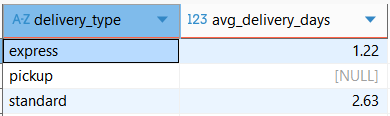
과제 1. 주문 상태별 운영 지표(아이템/주문 혼합)
✅ 문제
`order_status`별로 아래 지표를 집계하세요.
- `order_status`
- `orders` = 주문 수 (`COUNT(DISTINCT order_id)`)
- `item_rows` = 아이템 행 수 (`COUNT(*)`)
- `avg_items_per_order` = `item_rows / orders` (소수점 2자리 반올림)
조건:
- 아이템 행 수가 10 이상인 상태만 남기기 (`HAVING` 사용)
정렬:
- `orders DESC`
select
	order_status,
	COUNT(DISTINCT order_id) as orders,
	COUNT(*) as item_rows,
	round(COUNT(*)/COUNT(DISTINCT order_id),2) as avg_items_per_order
from basic.order_items
group by order_status
having COUNT(*)>=10
order by orders desc;
과제 2. 채널별 취소/환불율(주문 레벨, 조건부 집계)
✅ 문제
`channel`별로 주문 레벨에서 아래를 구하세요.
- `channel`
- `total_orders` = 전체 주문 수
- `cancelled_orders` = 취소 주문 수 (`order_status='cancelled'`)
- `refunded_orders` = 환불 주문 수 (`order_status='refunded'`)
- `cancel_or_refund_orders` = 취소 또는 환불 주문 수
- `cancel_or_refund_rate_pct` = (`cancel_or_refund_orders / total_orders * 100`) 소수점 1자리
조건:
- 전체 주문 수가 20 이상인 채널만 (`HAVING`)
정렬:
- `cancel_or_refund_rate_pct DESC`, `channel ASC`
> 힌트: 주문 수는 COUNT(DISTINCT order_id)
> 조건부 주문 수는 `COUNT(DISTINCT CASE WHEN ... THEN order_id END)` 패턴 사용
select
	channel,
	count(distinct order_id) as total_orders,
	count(distinct case when order_status='cancelled' then order_id end) as cancelled_orders,
	count(distinct case when order_status='refunded' then order_id end) as refunded_orders,
	count(distinct case when order_status='cancelled' then order_id end)+count(distinct case when order_status='refunded' then order_id end) as cancel_or_refund_orders,
	round((count(distinct case when order_status='cancelled' then order_id end)+count(distinct case when order_status='refunded' then order_id end))/count(distinct order_id)*100, 1) as cancel_or_refund_rate_pct
from basic.order_items
group by channel
having count(distinct order_id)>=20
order by cancel_or_refund_rate_pct DESC, channel asc;
#직접 작성한 쿼리 (count + count 사용)
SELECT
  channel,
  COUNT(DISTINCT order_id) AS total_orders,
  COUNT(DISTINCT CASE WHEN order_status = 'cancelled' THEN order_id END) AS cancelled_orders,
  COUNT(DISTINCT CASE WHEN order_status = 'refunded' THEN order_id END) AS refunded_orders,
  COUNT(DISTINCT CASE WHEN order_status IN ('cancelled', 'refunded') THEN order_id END) AS cancel_or_refund_orders,
  ROUND(
    COUNT(DISTINCT CASE WHEN order_status IN ('cancelled', 'refunded') THEN order_id END)
    / COUNT(DISTINCT order_id) * 100.0
  , 1) AS cancel_or_refund_rate_pct
FROM basic.order_items
GROUP BY channel
HAVING COUNT(DISTINCT order_id) >= 20
ORDER BY cancel_or_refund_rate_pct DESC, channel ASC;
#모범 답안 쿼리 (in(a,b) 사용)
과제 3. 지역별 쿠폰 사용률(주문 레벨 + NULL 활용) ★★★
✅ 문제
`region`별로 아래를 집계하세요. (주문 레벨)
- `region`
- `total_orders`
- `coupon_orders` = 쿠폰 사용 주문 수 (`coupon_code IS NOT NULL`)
- `coupon_order_pct` = 쿠폰 사용 주문 비율(%), 소수점 1자리
- `no_coupon_orders` = 쿠폰 미사용 주문 수 (`coupon_code IS NULL`)
- `pickup_orders` = 픽업 주문 수 (`delivery_type='pickup'`)
조건:
- 쿠폰 사용 주문 수가 5 이상인 지역만 (`HAVING`)
정렬:
- `coupon_order_pct DESC`, `coupon_orders DESC`
select
	region,
	count(distinct order_id) as total_orders,
	count(distinct case when coupon_code is not null then order_id end) as coupon_orders,
	round(count(distinct case when coupon_code is not null then order_id end)/count(distinct order_id)*100, 1) as coupon_order_pct,
	count(distinct case when coupon_code is null then order_id end) as no_coupon_orders,
	count(distinct case when delivery_type='pickup' then order_id end) as pickup_orders
from basic.order_items
group by region
having count(distinct case when coupon_code is not null then order_id end)>=5
order by coupon_order_pct desc, coupon_orders desc;
과제 4. 카테고리별 “매출 + 반품 + 리뷰”(완료 주문 기반)
✅ 문제
`order_status='completed'`만 대상으로 `product_category`별 아래를 집계하세요.
- `product_category`
- `completed_items` = 완료 아이템 행 수
- `net_sales` = `SUM(unit_price * quantity * (1 - discount_rate))` (반올림해서 정수)
- `returned_items` = 반품 아이템 수 (`is_returned=1`)
- `return_rate_pct` = `returned_items / completed_items * 100` (소수점 1자리)
- `review_cnt` = 리뷰가 달린 아이템 수 (`COUNT(review_score)`)
- `review_rate_pct` = `review_cnt / completed_items * 100` (소수점 1자리)
조건:
- 완료 아이템 행 수가 15 이상인 카테고리만 (`HAVING`)
정렬:
- `net_sales DESC`
select
	product_category,
	count(*) as completed_items,
	round(SUM(unit_price * quantity * (1 - discount_rate)), 0) as net_sales,
	count(distinct case when is_returned=1 then order_item_id end) as returned_items,
	round(count(distinct case when is_returned=1 then order_item_id end)/count(*)*100, 1) as return_rate_pct,
	count(review_score) as review_cnt,
	round(count(review_score)/count(*)*100, 1) as review_rate_pct
from basic.order_items
where order_status='completed'
group by product_category
having count(*)>=15
order by net_sales desc;#직접 작성한 쿼리 (COUNT(DISTINCT CASE WHEN 조건 THEN 컬럼 END) 사용)
SELECT
  product_category,
  COUNT(*) AS completed_items,
  ROUND(SUM(unit_price * quantity * (1 - discount_rate)), 0) AS net_sales,
  SUM(CASE WHEN is_returned = 1 THEN 1 ELSE 0 END) AS returned_items,
  ROUND(
    SUM(CASE WHEN is_returned = 1 THEN 1 ELSE 0 END) / COUNT(*) * 100.0
  , 1) AS return_rate_pct,
  COUNT(review_score) AS review_cnt,
  ROUND(
    COUNT(review_score) / COUNT(*) * 100.0
  , 1) AS review_rate_pct
FROM basic.order_items
WHERE order_status = 'completed'
GROUP BY product_category
HAVING COUNT(*) >= 15
ORDER BY net_sales DESC;
#모범 답안 쿼리 (CASE WHEN 조건 THEN 1 ELSE 0 END 사용)
데일리 퀴즈
Q1. COUNT(review_score)는 무엇을 세나요?
A. 전체 행 수
B. `review_score`가 NULL이 아닌 행 수
C. `review_score`의 서로 다른 값 개수
D. `review_score`의 평균
Q2. 다음 중 올바른 설명은?
A. `WHERE`는 집계함수 조건을 사용할 수 있다
B. `HAVING`은 그룹이 만들어지기 전에 적용된다
C. `HAVING`은 그룹(집계 결과)에 조건을 적용할 수 있다
D. `WHERE`는 그룹을 필터링한다
Q3. 다음 쿼리가 문제가 될 수 있는 이유는?
SELECT product_category, product_name, SUM(unit_price*quantity)
FROM basic.order_items
WHERE order_status='completed'
GROUP BY product_category;
A. `SUM()`은 SELECT에서 사용할 수 없다
B. `product_name`이 GROUP BY에도 없고 집계도 아니라서
C. `WHERE`절이 없어서
D. `ORDER BY`가 없어서
Q4. 다음 중 WHERE에 대한 설명으로 맞는 것은?
A. 그룹 생성 후에 적용된다
B. 집계함수를 참조할 수 있다
C. 행(row) 단위 필터에 사용된다
D. 그룹 단위 필터에 사용된다
Q5. GROUP BY 없이 집계 함수만 쓰면 결과는 어떻게 되나요?
A. 에러가 난다
B. 각 행이 한 그룹이 된다
C. 전체 행이 하나의 집계 그룹으로 처리된다
D. DISTINCT가 자동으로 적용된다
엑셀보다 쉽고 빠른 SQL) 5. SQL로 업무시간 단축하기
조회한 데이터에 아무 값이 없다면?
방법 1. 없는 값을 제외해주기
select
	restaurant_name,
	avg(rating) as avg_rating,
	avg(if(rating <>'Not given', rating, null)) as avg_rating2
from food_orders
group by restaurant_name
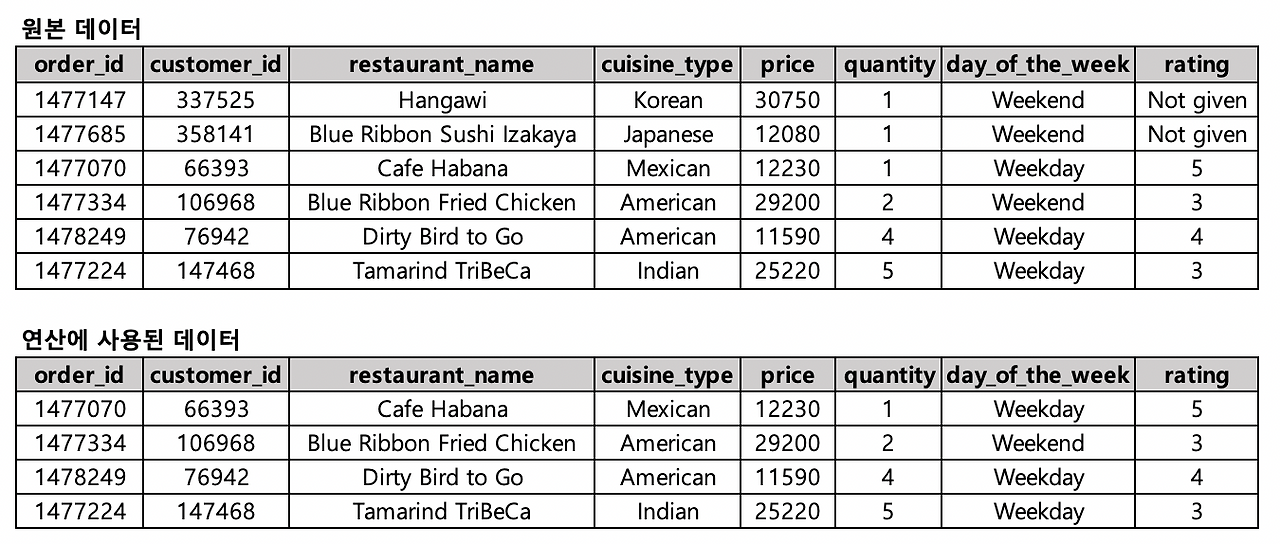
- null 값 처리 안해주면 원본 데이터 (0+0+5+3+4+3)/6
- null 값 처리해주면 연산에 사용된 데이터 (5+3+4+3)/4
#테이블 join할 때 null 값 제외하고 가져오기
select a.order_id,
       a.customer_id,
       a.restaurant_name,
       a.price,
       b.name,
       b.age,
       b.gender
from food_orders a left join customers b on a.customer_id=b.customer_id
where b.customer_id is not null
방법 2. 다른 값을 대신 사용하기
- 다른 값이 있을 때 조건문 이용하기 : if(rating>=1, rating, 대체값)
- null 값일 때 : coalesce(age, 대체값)
select a.order_id,
       a.customer_id,
       a.restaurant_name,
       a.price,
       b.name,
       b.age,
       coalesce(b.age, 20) "null 제거",
       b.gender
from food_orders a left join customers b on a.customer_id=b.customer_id
where b.age is null
상식적이지 않은 데이터 값이 있을 때는?
방법. 조건문으로 값의 범위를 지정하기
select
	name,
	age,
	case when age<15 then 15
		 when age>=80 then 80
		 else age
		 end as re_age
from customers
→ 15세 미만이라면 15세로, 80세 이상이면 80세로 대체!
Pivot Table
: 2개 이상의 기준으로 데이터를 집계할 때, 보기 쉽게 배열하여 보여주는 것
Base Data 만들기 → Base Data 이용해서 Pivot View 만들기
실습 문제
Q1. 음식점별 시간별 주문건수 Pivot Table 뷰 만들기 (15~20시 사이, 20시 주문건수 기준 내림차순)
select restaurant_name,  #행 축 이름
       max(if(hh='15', cnt_order, 0)) "15",
       max(if(hh='16', cnt_order, 0)) "16",
       max(if(hh='17', cnt_order, 0)) "17",
       max(if(hh='18', cnt_order, 0)) "18",
       max(if(hh='19', cnt_order, 0)) "19",
       max(if(hh='20', cnt_order, 0)) "20"
from
(
select a.restaurant_name,
       substring(b.time, 1, 2) hh,
       count(1) cnt_order
from food_orders a inner join payments b on a.order_id=b.order_id
where substring(b.time, 1, 2) between 15 and 20
group by 1, 2
) a
group by 1
order by 7 desc
Pivot Table 만들 때 max는 데이터 보기 쉬우라고 필수로 해야하는 함수임!
max나 sum 같은 함수 쓰면 group by 따라서 나와야 함!
Q2. 성별, 연령별 주문건수 Pivot Table 뷰 만들기 (나이는 10~59세 사이, 연령 순으로 내림차순)
SELECT
	age,
	max(if(gender='male', cnt_order, 0)) as 'male',
	max(if(gender='female', cnt_order, 0)) as 'female'
from
(
SELECT
	gender,
	case when age between 10 and 19 then 10
		when age between 20 and 29 then 20
		when age between 30 and 39 then 30
		when age between 40 and 49 then 40
		when age between 50 and 59 then 50
		end age,
	count(*) as cnt_order
from food_orders f inner join customers c on f.customer_id = c.customer_id
where age between 10 and 59
group by 1, 2
) a
group by 1
order by 1 desc
Window Function의 기본 구조
window_function(argument) over (partition by 그룹 기준 컬럼 order by 정렬 기준)- RANK : N번째까지의 대상을 조회하고 싶을 때
- SUM : 전체에서 차지하는 비율, 누적합을 구할 때
Q3. 음식 타입별로 주문 건수가 가장 많은 상점 3개씩 조회하기 ★ ★ ★
SELECT
	cuisine_type,
	restaurant_name,
	cnt_order,
	ranking
from
(
select
	cuisine_type,
	restaurant_name,
	cnt_order,  #count(*) as cnt_order 이렇게 쓰면 값 안 나옴
	rank() over (partition by cuisine_type order by cnt_order desc) as ranking   #rank 함수는 괄호 안에 아무 것도 안 적어도 됨!
from
(
select
	cuisine_type,
	restaurant_name,
	count(*) as cnt_order
from food_orders
group by 1, 2
) a
) b
where ranking<=3
Q4. 각 음식점의 주문건이 해당 음식 타입에서 차지하는 비율을 구하고, 주문건이 낮은 순으로 정렬했을 때 누적 합 구하기
select
	cuisine_type,
	restaurant_name,
	cnt_order,
	sum(cnt_order) over (partition by cuisine_type) as sum_cuisine, #그냥 합
	sum(cnt_order) over (partition by cuisine_type order by cnt_order) as cum_cuisine #누적합은 순차적으로 더해주니까 order by 입력!
from
(
select
	cuisine_type,
	restaurant_name,
	count(*) as cnt_order
from food_orders
group by 1, 2
) a
order by cuisine_type, cnt_order

날짜 데이터 다루기
Q5. date type 을 date_format 을 이용하여 년, 월, 일, 주 로 조회해보기
○ 년 : Y (4자리), y(2자리)
○ 월 : M, m
○ 일 : d, e
○ 요일 : w
select date(date) date_type,
       date_format(date(date), '%Y') "년",
       date_format(date(date), '%m') "월",
       date_format(date(date), '%d') "일",
       date_format(date(date), '%w') "요일"
from payments
date_format(datetime type의 값 넣어주기! 여기서는 date(date) , '%원하는 포맷')
Q5. 년도별 3월의 주문건수 구하기
SELECT
	date_format(date(date), '%Y') '년',
	date_format(date(date), '%m') '월',
	date_format(date(date), '%Y%m') '년월',
	count(*) as '주문건수'
from food_orders f inner join payments p on f.order_id = p.order_id
where date_format(date(date), '%m') = '03'
group by 1, 2, 3
order by 1
Q. 음식 타입별, 연령별 주문건수 pivot view 만들기
음식 타입별, 연령별 주문건수 pivot view 만들어 봅시다. (연령은 10~59세 사이)
select
	cuisine_type,
	max(if(age_group='10대', cnt_order, 0)) as '10대',
	max(if(age_group='20대', cnt_order, 0)) as '20대',
	max(if(age_group='30대', cnt_order, 0)) as '30대',
	max(if(age_group='40대', cnt_order, 0)) as '40대',
	max(if(age_group='50대', cnt_order, 0)) as '50대'
from
(
select
	f.cuisine_type,
	case when c.age between 10 and 19 then '10대'
		 when c.age between 20 and 29 then '20대'
		 when c.age between 30 and 39 then '30대'
		 when c.age between 40 and 49 then '40대'
		 when c.age between 50 and 59 then '50대'
		 end as age_group,
		 count(*) as cnt_order
from food_orders f inner join customers c on f.customer_id = c.customer_id
where c.age between 10 and 59
group by 1, 2
) a
group by 1
#직접 작성한 쿼리
select cuisine_type,
       max(if(age=10, order_count, 0)) "10대",
       max(if(age=20, order_count, 0)) "20대",
       max(if(age=30, order_count, 0)) "30대",
       max(if(age=40, order_count, 0)) "40대",
       max(if(age=50, order_count, 0)) "50대"
from
(
select a.cuisine_type,
       case when age between 10 and 19 then 10
            when age between 20 and 29 then 20
            when age between 30 and 39 then 30
            when age between 40 and 49 then 40
            when age between 50 and 59 then 50 end age,
       count(1) order_count
from food_orders a inner join customers b on a.customer_id=b.customer_id
where age between 10 and 59
group by 1, 2
) t
group by 1
#모범 답안 쿼리
'내일배움캠프 데이터 분석' 카테고리의 다른 글
| 6일차) 내일배움캠프 데이터 분석 TIL - SQL 기초(6) (0) | 2025.12.30 |
|---|---|
| 5일차) 내일배움캠프 데이터 분석 TIL - SQL 기초(5) (0) | 2025.12.29 |
| 3일차) 내일배움캠프 데이터 분석 TIL - SQL 기초(3) (0) | 2025.12.24 |
| 2일차) 내일배움캠프 데이터 분석 TIL - SQL 기초(2) (0) | 2025.12.23 |
| 1일차) 내일배움캠프 데이터 분석 TIL - SQL 기초(1) (0) | 2025.12.22 |
- Total
- Today
- Yesterday
- 통계
- 비전공자코딩
- Tableau
- 텍스트분석
- 코딩기초
- 구글코랩
- SQL
- git
- 머신러닝
- 파이썬입문
- 데이터분석
- Python
- 판다스
- 내일배움캠프
- github
- 중학생코딩
- 코딩처음
- Til
- GoogleColab
- 파이썬
- 프로그래밍입문
- 데이터시각화
- 태블로
- 코드카타
- 데이터분석입문
| 일 | 월 | 화 | 수 | 목 | 금 | 토 |
|---|---|---|---|---|---|---|
| 1 | 2 | |||||
| 3 | 4 | 5 | 6 | 7 | 8 | 9 |
| 10 | 11 | 12 | 13 | 14 | 15 | 16 |
| 17 | 18 | 19 | 20 | 21 | 22 | 23 |
| 24 | 25 | 26 | 27 | 28 | 29 | 30 |
| 31 |